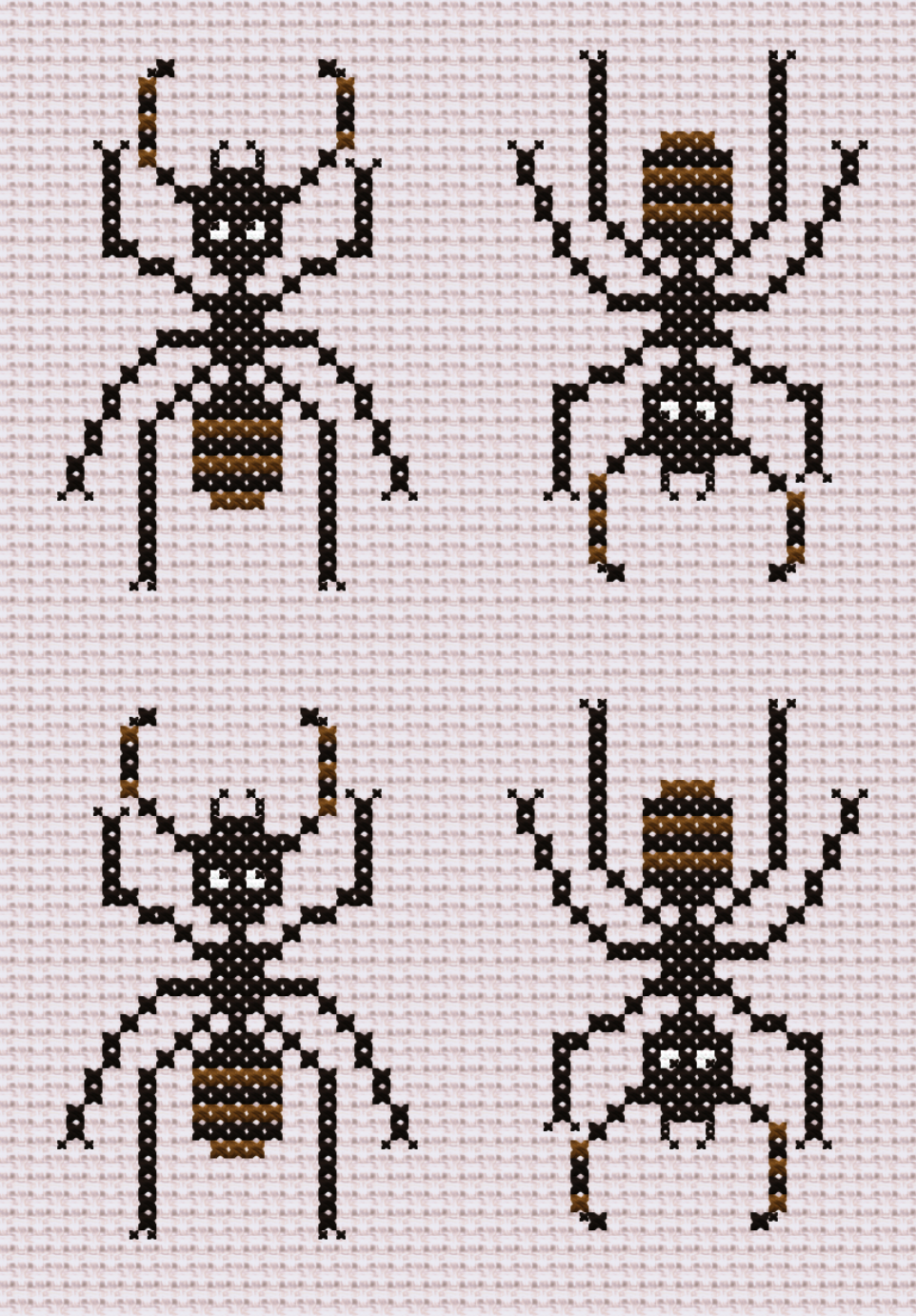
Do you want to design a cross-stitch pattern?
-
Do you want to design a cross-stitch pattern? This website is neat.
Now to try to figure out how to print this. If it works it could be fun to make different species.
I think I'd like to see how small I can make the patterns. Since I am very lazy and won't complete a big complex project.
There are also sites that will convert photos, but the results look like waaaay too much work to really make.

FlossCross - Free online cross stitch pattern maker
Creating your own cross stitch chart is very easy with FlossCross. It is possible to import pattern from photo or design it from empty canvas.

(flosscross.com)
-
Do you want to design a cross-stitch pattern? This website is neat.
Now to try to figure out how to print this. If it works it could be fun to make different species.
I think I'd like to see how small I can make the patterns. Since I am very lazy and won't complete a big complex project.
There are also sites that will convert photos, but the results look like waaaay too much work to really make.
FlossCross - Free online cross stitch pattern maker
Creating your own cross stitch chart is very easy with FlossCross. It is possible to import pattern from photo or design it from empty canvas.
(flosscross.com)
-
@futurebird Maybe it would be a fun exercise for some of your students to make a stop-motion cross stitch ant animation?
I am very tempted by this. Once I try this little project I'll have a sense of if we could do it.
One thing I can't figure out is how to have everyone involved in the design? Maybe we have each student modify the frame a little ... that could work.
-
Do you want to design a cross-stitch pattern? This website is neat.
Now to try to figure out how to print this. If it works it could be fun to make different species.
I think I'd like to see how small I can make the patterns. Since I am very lazy and won't complete a big complex project.
There are also sites that will convert photos, but the results look like waaaay too much work to really make.
FlossCross - Free online cross stitch pattern maker
Creating your own cross stitch chart is very easy with FlossCross. It is possible to import pattern from photo or design it from empty canvas.
(flosscross.com)
The fabric used for #crossstitch (if you want a neat grid) is called 'AIDA' I thought there would be a service that would print pattern (*.json or *.oxs files? there seem to be many formats)
This isn't really a thing. Oh yes, they will do it for *photos* but, I think precision printing that lines up with the grid is a challenge.
(Also most pattern designers are more experienced than I am. They seem to just count it out... or they use iron-on patterns which sounds hard.)
I will try counting.
-
 F myrmepropagandist shared this topic
-
The fabric used for #crossstitch (if you want a neat grid) is called 'AIDA' I thought there would be a service that would print pattern (*.json or *.oxs files? there seem to be many formats)
This isn't really a thing. Oh yes, they will do it for *photos* but, I think precision printing that lines up with the grid is a challenge.
(Also most pattern designers are more experienced than I am. They seem to just count it out... or they use iron-on patterns which sounds hard.)
I will try counting.
@futurebird I use a pixel art program called aseprite
Edit: oh I misunderstood what you were looking for, you want to print on aida cloth
-
The fabric used for #crossstitch (if you want a neat grid) is called 'AIDA' I thought there would be a service that would print pattern (*.json or *.oxs files? there seem to be many formats)
This isn't really a thing. Oh yes, they will do it for *photos* but, I think precision printing that lines up with the grid is a challenge.
(Also most pattern designers are more experienced than I am. They seem to just count it out... or they use iron-on patterns which sounds hard.)
I will try counting.
I was hoping I could just send off the file and get the whole kit bundled together with a printed fabric pattern, floss of the right colors and a little hoop.
But, I will need to do that myself.
So I might make some extra kits to give as gifts.
Who wouldn't want to contemplate an ant in this way.
The plan* continues!
*promoting ants
-
I was hoping I could just send off the file and get the whole kit bundled together with a printed fabric pattern, floss of the right colors and a little hoop.
But, I will need to do that myself.
So I might make some extra kits to give as gifts.
Who wouldn't want to contemplate an ant in this way.
The plan* continues!
*promoting ants
I feel like many craft people underestimate the laziness of beginners.
Things like "buying floss" are very intimidating. But it shall be done.
-
@futurebird I use a pixel art program called aseprite
Edit: oh I misunderstood what you were looking for, you want to print on aida cloth
Do you just make your patterns without a guide? How do you do that?
-
Do you just make your patterns without a guide? How do you do that?
@futurebird to an extent, yeah. Aseprite lets you use grids to count things out easily, though. I'll take a couple screenshot once I'm on my computer again
-
The fabric used for #crossstitch (if you want a neat grid) is called 'AIDA' I thought there would be a service that would print pattern (*.json or *.oxs files? there seem to be many formats)
This isn't really a thing. Oh yes, they will do it for *photos* but, I think precision printing that lines up with the grid is a challenge.
(Also most pattern designers are more experienced than I am. They seem to just count it out... or they use iron-on patterns which sounds hard.)
I will try counting.
@futurebird Most folks count. Do yourself a favor and pencil in grid lines on your Aida (to match the grid lines on your pattern). It will make the counting so much easier.

-
@futurebird to an extent, yeah. Aseprite lets you use grids to count things out easily, though. I'll take a couple screenshot once I'm on my computer again
@futurebird ok, so here's a little impromptu ersatz tutorial

as an example, let's make a 3x5 inch pattern of an ant on 14-count cloth, which means we'll want a 42x70 pixel canvas (or, if you wanna get crazy with it and allow for stitches that aren't just Xs, triple it; this will allow you to make a 3x3 pixel X in each "square" and thus do diagonals, but most of what i've done has been Xs)
i've set up this canvas to have a transparent background showing 14x14 checkerboard to represent 1 inch of cloth, i've enabled the pixel grid for easier counting when needed, and i've set the normal grid to 7x7 because i find that using half the stitch count helps with counting/spacing things out
from there it's just a matter of designing what you want and putting it in the right place. aseprite also allows you to add references that don't have to be scaled to the canvas's pixel size, as in the third picture (using a photo of a velvet ant in this example)


-
@futurebird ok, so here's a little impromptu ersatz tutorial
as an example, let's make a 3x5 inch pattern of an ant on 14-count cloth, which means we'll want a 42x70 pixel canvas (or, if you wanna get crazy with it and allow for stitches that aren't just Xs, triple it; this will allow you to make a 3x3 pixel X in each "square" and thus do diagonals, but most of what i've done has been Xs)
i've set up this canvas to have a transparent background showing 14x14 checkerboard to represent 1 inch of cloth, i've enabled the pixel grid for easier counting when needed, and i've set the normal grid to 7x7 because i find that using half the stitch count helps with counting/spacing things out
from there it's just a matter of designing what you want and putting it in the right place. aseprite also allows you to add references that don't have to be scaled to the canvas's pixel size, as in the third picture (using a photo of a velvet ant in this example)
@futurebird smokey horizon on lospec has uploaded palettes of DMC embroidery floss colors converted to RGB:
- https://lospec.com/palette-list/dmc-to-rgb-conversion-part-1
- https://lospec.com/palette-list/dmc-to-rgb-conversion-part-2
you can import these directly into aseprite, or you can just use them as references to add the colors you plan to use! for this example i have not done that and am just using whatever palette i already had open, but it's pretty easy to swap it, and you can also just out & out import PAL files (and others—i'm pretty sure you can import a PNG and it'll make a palette of every color in it?)
you can also change the opacity of your reference images, like so

-
@futurebird smokey horizon on lospec has uploaded palettes of DMC embroidery floss colors converted to RGB:
- https://lospec.com/palette-list/dmc-to-rgb-conversion-part-1
- https://lospec.com/palette-list/dmc-to-rgb-conversion-part-2
you can import these directly into aseprite, or you can just use them as references to add the colors you plan to use! for this example i have not done that and am just using whatever palette i already had open, but it's pretty easy to swap it, and you can also just out & out import PAL files (and others—i'm pretty sure you can import a PNG and it'll make a palette of every color in it?)
you can also change the opacity of your reference images, like so
@futurebird kinda half-assed this since it's just for a tutorial but i think you probably get the idea